Parse MSCONS files
instantly in your browser
A free online parser and viewer for MSCONS EDIFACT energy data files. Inspect Lastgang, Zählerstandsgang and Viertelstundenwerte, validate MIG message structure and look up BDEW market participants, no installation required.
⚡ Open the parserSee it in action
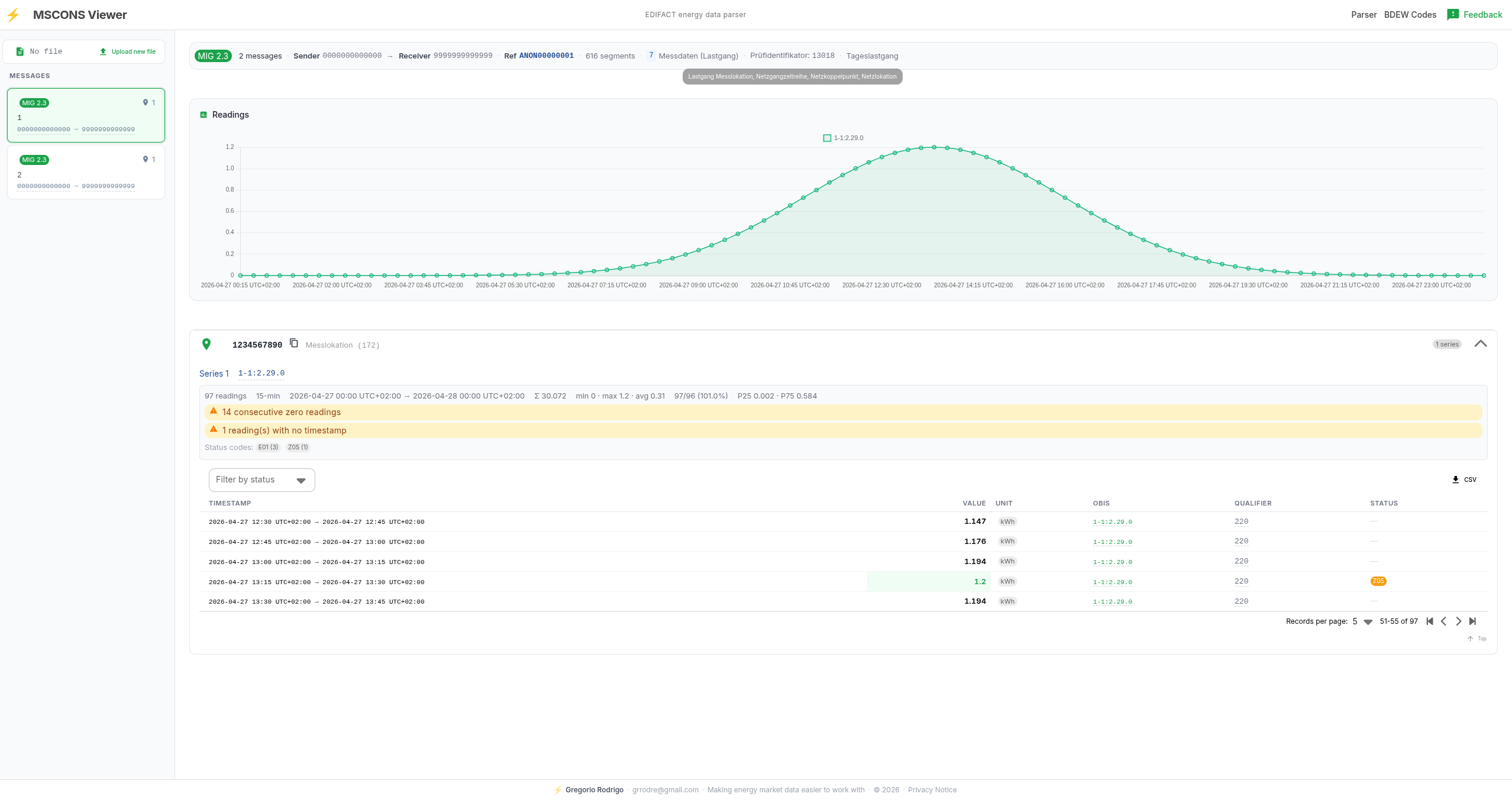
Parsed Tageslastgang — MIG 2.3, Prüfidentifikator 13018, 97 readings, OBIS 1-1:2.29.0, gap and anomaly detection, CSV export.
What you can do with it
Parse any MSCONS file
Upload a file and get an instant structured breakdown of all messages, metering points and time series.
Inspect meter readings
View Lastgang, Tageslastgang, Monatslastgang and Zählerstandsgang data with statistics, gap detection and completeness checks across all Zählpunkte.
Validate message structure
See MIG version, Prüfidentifikator, sender and receiver roles (Messstellenbetreiber, Netzbetreiber, Lieferant), and references at a glance.
Look up BDEW codes
Sender and receiver BDEW codes are resolved to Marktkommunikation participant names and functions automatically.
Detect anomalies
Identify gaps, duplicate timestamps, consecutive zero readings and missing timestamps in time series data.
Export readings
Download any time series as a CSV file for further processing in Excel or other tools.
How to use it
Upload your file
Click "Open the parser" and drag in your MSCONS .txt or .edi file. No account or installation needed.
Inspect the structure
Browse messages, Zählpunkte, time series and readings. BDEW codes are resolved automatically. Anomalies are flagged inline.
Export or validate
Download any time series as CSV, or use the structured view to verify Prüfidentifikator, MIG version and segment counts.
What is MSCONS?
MSCONS (Metered Services Consumption) is a UN/EDIFACT message type used in the German energy market for the electronic exchange of metered consumption data. It is defined by BDEW (Bundesverband der Energie- und Wasserwirtschaft) and governs how Messstellenbetreiber, Netzbetreiber, Lieferanten and Bilanzkreisverantwortliche exchange Lastgang and Zählerstandsdaten under MaBiS and GPKE regulations.
MSCONS files carry Viertelstundenwerte (15-minute RLM load profiles), Tageslastgang, Monatslastgang and Zählerstandsgang data identified by Marktlokation (MaLo) and Messlokation (MeLo). Each message references a Prüfidentifikator that classifies the data type and transmission context. Message formatting rules are defined in the Marktimplementierungshandbuch (MIG), published by the Bundesnetzagentur.
This tool parses any MSCONS file and presents the data in a clear, readable format — no software installation required.
Frequently asked questions
How do I open an MSCONS file?
Click "Open the parser" on this page, then drag and drop your MSCONS file — or use the file picker. The tool reads the EDIFACT structure and immediately shows all messages, metering points, time series and readings in a structured view. No installation, account or registration is required.
Was ist ein Prüfidentifikator in MSCONS?
Der Prüfidentifikator (PrüfID) klassifiziert den Inhalt einer MSCONS-Nachricht gemäß dem Marktimplementierungshandbuch (MIG). Typische Werte: 13018 (Tageslastgang RLM), 11016 (Zählerstandsgang), 13002 (Monatslastgang), 13001 (Übermittlung von Lastgangzeitreihen). Der Viewer zeigt den Prüfidentifikator für jede Nachricht direkt in der Übersicht an.
What is the difference between RLM and SLP in a Lastgang?
RLM (Registrierende Leistungsmessung) records actual measured 15-minute intervals (Viertelstundenwerte) for larger consumers and generators. SLP (Standardlastprofil) uses a synthetic daily load profile for smaller metering points and is not transmitted as raw readings in MSCONS. MSCONS files typically carry RLM time series. The viewer shows interval length, total reading count and completeness percentage for each series.
What is an OBIS code?
OBIS (Object Identification System) codes identify the type of measurement in a time series — for example 1-1:1.8.0 for active energy import or 1-1:2.8.0 for feed-in. The viewer displays the OBIS code for each reading series and links it to the corresponding measurement type.
Are my MSCONS files stored on the server?
No. Uploaded files are sent to the server for parsing, processed in memory, and not stored. The file content is not retained after the parsed response is returned.
Welche MSCONS-Versionen werden unterstützt?
Der Parser unterstützt MSCONS nach MIG 2.3 (aktuell gültige Version im deutschen Energiemarkt). Ältere MIG-Versionen lassen sich in der Regel ebenfalls lesen, da die EDIFACT-Grundstruktur weitgehend identisch ist. Bei Dateien, die nicht korrekt geparst werden, ist Feedback über den Feedback-Button im Parser willkommen.
Was ist ein MSCONS Viewer?
MSCONS-Dateien sind UN/EDIFACT-Nachrichten, die im deutschen Energiemarkt für den Austausch von Messwerten zwischen Marktteilnehmern verwendet werden, etwa zwischen Messstellenbetreiber, Netzbetreiber und Lieferant im Rahmen der Marktkommunikation (MaKo) nach MaBiS und GPKE.
Mit diesem kostenlosen Online-Tool kannst du MSCONS-Dateien direkt im Browser öffnen und lesen, ohne Software zu installieren. Die Zeitreihen — Lastgang, Tageslastgang, Monatslastgang, Zählerstandsgang und Viertelstundenwerte — werden übersichtlich dargestellt. Lücken, Dopplungen und fehlende Werte werden automatisch erkannt. Der Prüfidentifikator, die MIG-Version sowie Sender- und Empfänger-BDEW-Codes werden direkt angezeigt.